
X — east / west
Bigger (more positive) = further east, more negative = further west.
Coordinates
Pause the game (press ESC) and look at the bottom-right corner of the screen. Your current position shows there as three numbers — X, Y and Z. That's it. Below: what each number means, and a calculator that turns them into a distance and bearing to anywhere on the map.
Quick answer
ESC → bottom-right corner → three numbers (X, Y, Z). X is east/west, Y is north/south, Z is depth (more negative = deeper).
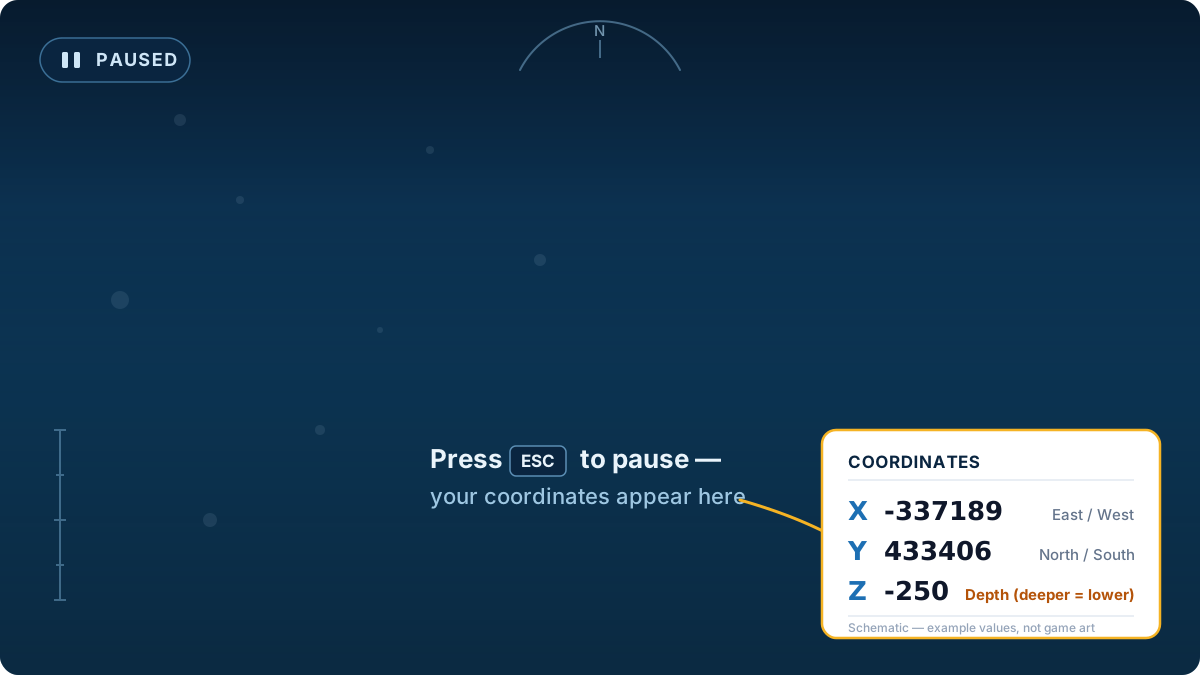
Bigger (more positive) = further east, more negative = further west.
In Subnautica 2 the second value tracks your north/south position.
0 is sea level; the more negative it gets, the deeper you are.
Easiest check: swim up or down and watch the numbers. The one that changes as you dive is your depth — it gets more negative the deeper you go, and sits near 0 at the surface. The other two only change when you move horizontally. This page describes the raw in-game HUD order; this site's resource tables normalize coordinates so Y means depth, and the calculator converts for you when Raw pause-menu HUD mode is selected.
The calculator below is set to read raw pause-menu numbers. Type your X / Y / Z as your current position, enter where you want to go, and you get horizontal distance, compass bearing, and depth change. (Already using this site's map coordinates instead? Switch the mode to "Map coordinates".)
Compare any two Subnautica 2 coordinate points.
Find the nearest resource from your current position.
Check current map-size and boundary notes.
Review Collector Leviathan route-safety notes.